Geek LabsLIMITED

Public sector and volunteer management solutions

Tools built around how {public service} really works

Geek Labs makes two products. Muster manages duties, hours and skills for volunteers, the people who lead them and youth groups. Commentary gives drivers the road, junctions and landmarks they need to say exactly where they are, on iPhone and CarPlay.

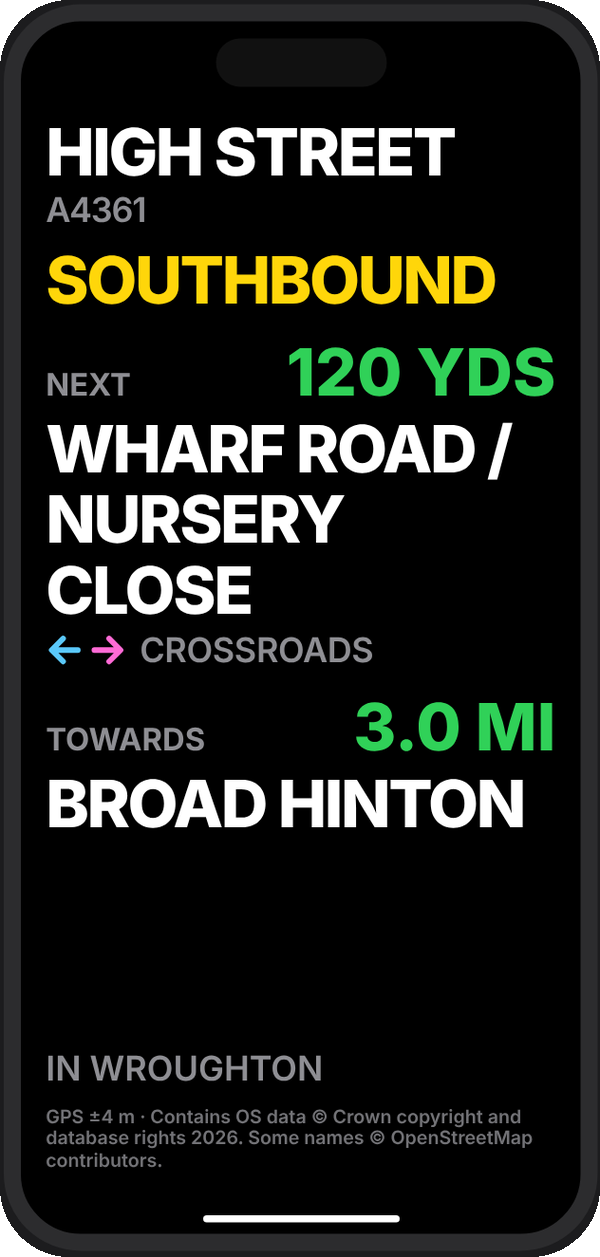
Commentary on iPhone: High Street, A4361, southbound. Next in 120 yards: Wharf Road and Nursery Close, a crossroads. Towards Broad Hinton, 3.0 miles. In Wroughton.
Commentary on iPhone. Mock-up drawn from the app’s layout code.

Volunteer duty management

Muster

In development · working prototype

One system for every group of volunteers an organisation runs, with separate roles, duties and forms for each, on a desktop browser and a mobile app.

  • Book, cancel and swap duties. Only duties a volunteer is qualified for are offered, with in-date skills checked against the duty date, and every blocked duty says why.
  • Hours and minimums. Hours are approved by a supervisor, and each volunteer is tracked against their monthly minimum, with alerts.
  • Skills and training. Authorisations carry expiry dates, and specialist courses follow the organisation’s own sign-off pathway.
  • Young volunteers protected. Records, parental contacts and consents for under-18s are seen by their group leaders only, and every view is logged.
  • Groups kept apart. Each volunteer group sees only its own people. Wider access is granted explicitly and recorded.
  • Your organisation’s terms. Role titles follow your structure, along with minimum hours and other settings for each organisation.
  • Runs where you need it. In your organisation’s own Microsoft Azure tenant with sign-in through your existing accounts, or as a service hosted by Geek Labs.
Muster
HomeDutiesHoursSkillsTraining
Community event support2 of 4 booked
Sat 10:00–16:00 · Market Place
VolunteersNeeds First aid
Youth group session1 of 3 booked
Tue 18:30–20:30 · Community centre
VolunteersNeeds Enhanced DBS
Enhanced DBS is not on your record
This month10h of 16h minimum

Illustration with made-up data.

Live road commentary · iPhone and CarPlay

Commentary

In testing · TestFlight

When you need to say exactly where you are on the road, it has to be fast and accurate. Commentary shows it in large, high-contrast capitals instead of a map, so it can be read at a glance.

  • The road and direction. The road’s name and number, and the direction of travel: southbound on main roads, a compass point such as north-east elsewhere.
  • What’s next, and how far. The next junction or roundabout with its distance in yards or miles, and the roads it joins.
  • Nearside or offside. A cyan arrow for nearside, pink for offside, and both for a crossroads.
  • Towards and then. The place the road is heading for, and the named junction after the next one.
  • Landmarks and the town. A pub or other landmark being passed, with its side, and the town or village you are in.
  • No signal needed. Everything is worked out on the phone from a bundled Great Britain road network, built from Ordnance Survey data with OpenStreetMap names.
  • Location stays in the car. The vehicle’s position is never sent anywhere.

Next test build: speed limits, and a fixed layout where each section stays in the same place on the iPhone screen.

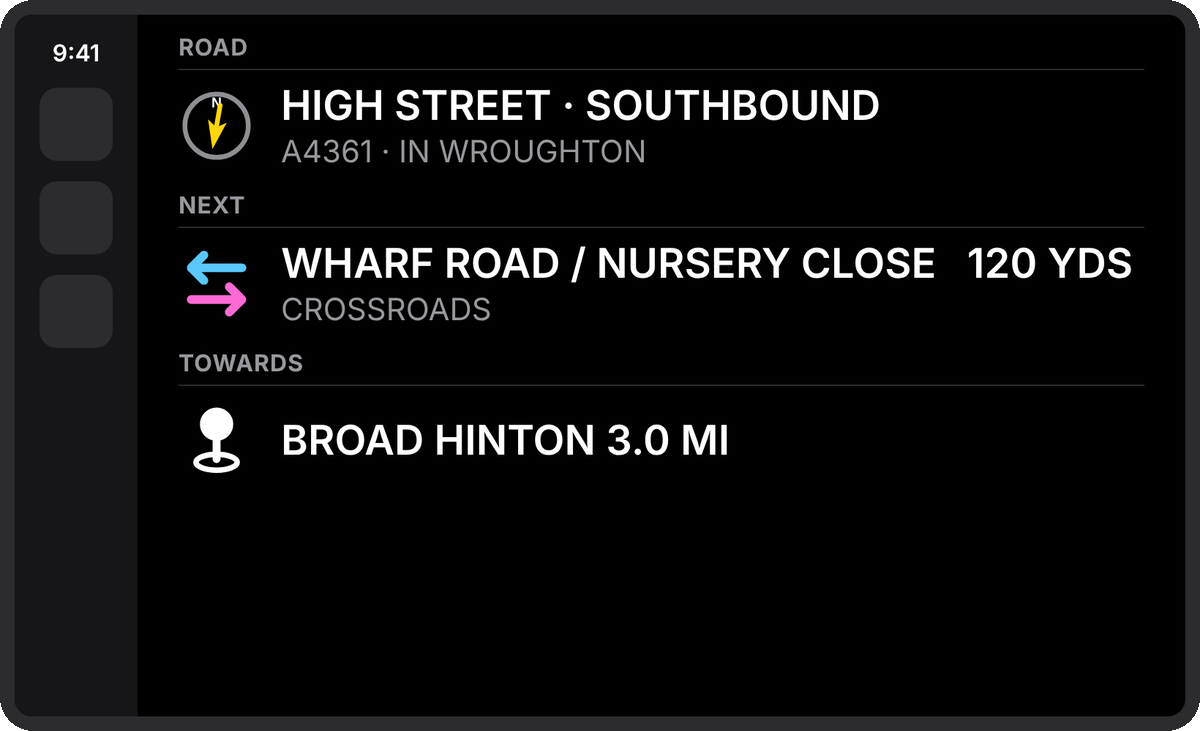
Commentary on CarPlay: High Street southbound, A4361, in Wroughton, with a compass. Next: Wharf Road and Nursery Close, crossroads, 120 yards. Towards Broad Hinton, 3.0 miles.
On CarPlay, the same information as a list beside a compass.
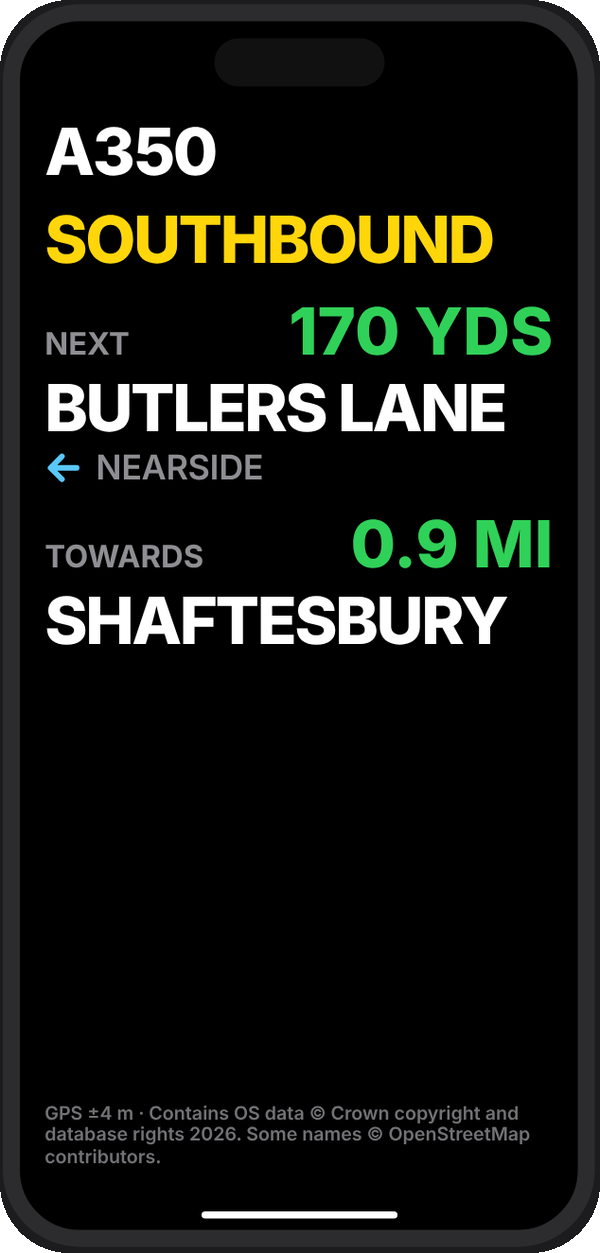
Commentary on iPhone: A350 southbound. Next in 170 yards: Butlers Lane, nearside. Towards Shaftesbury, 0.9 miles.
A side road on the nearside.
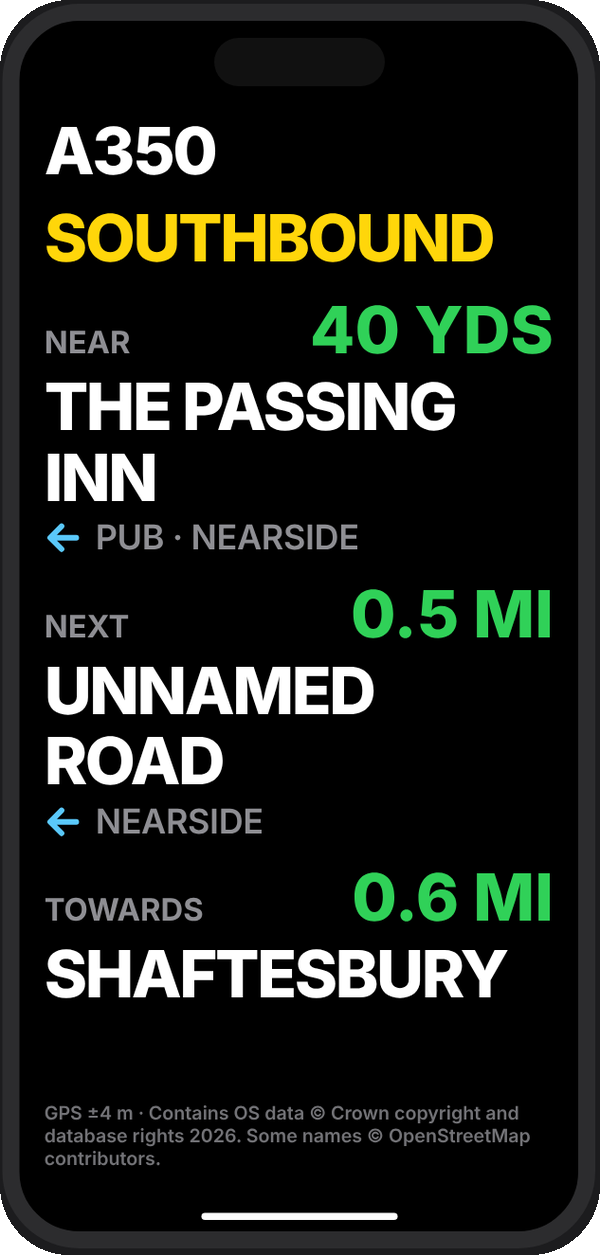
Commentary on iPhone: A350 southbound. Near: The Passing Inn, a pub on the nearside, 40 yards. Next: unnamed road, nearside, 0.5 miles. Towards Shaftesbury, 0.6 miles.
A landmark being passed.

Mock-ups drawn from the app’s layout code. Road wording is real output on Ordnance Survey data; the pub is made up.

Our approach

Designed for the constraints of the public sector

{ data }

Data stays where it should

Muster can run inside an organisation’s own cloud tenant, behind its existing sign-in. Commentary keeps the vehicle’s location on the phone.

{ field }

Works in the real world

Commentary needs no mobile signal. Muster offers routes for volunteers without work laptops or phones, and lets coordinators book on their behalf.

{ words }

Speaks the language

Nearside and offside. Your own role titles. Each product uses the terms staff and volunteers already use.

Contact

Talk to us about Muster or Commentary

For a demonstration, pilot or test access, get in touch.

Email
Company
Geek Labs Limited
Company number 17607831
Registered office: 44 Hornchurch Road, SN12 6QE